SmartPicks
How to Choose an Ergonomic Office Chair (Without Overpaying)
Disclosure: this page contains affiliate links. If you buy through them, we may earn a commission at no extra cost to you. We only recommend products we would use ourselves.
Finding a chair that keeps your back happy, your posture upright, and your budget intact can feel like hunting for a unicorn. In this guide I walk you through how to choose an ergonomic office chair (without overpaying) by breaking down the features that truly matter, highlighting the trade‑offs, and matching each option to a realistic budget and work style.
Quick picks
| Need | Recommendation |
|---|---|
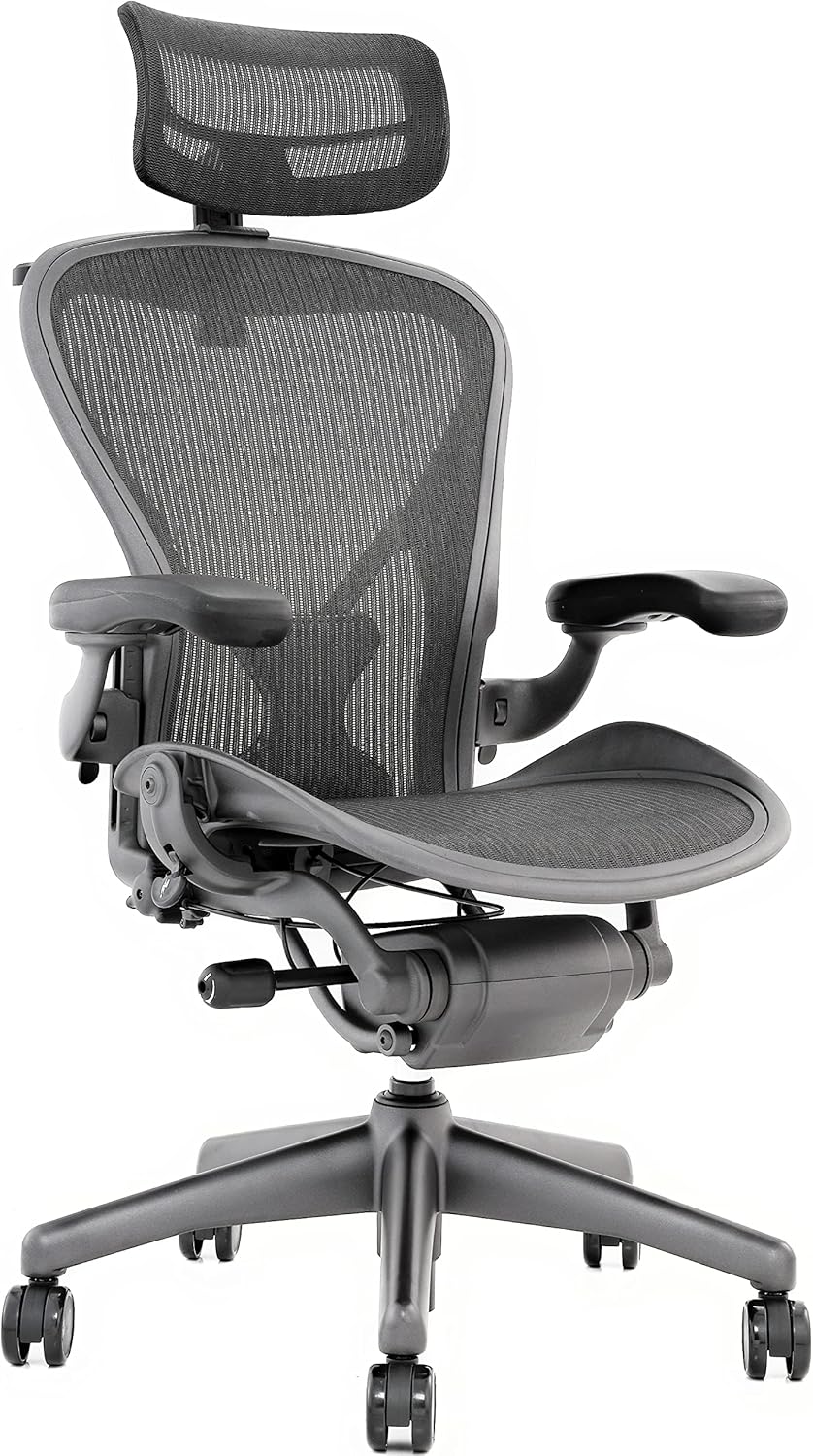
| Best overall | Herman Miller Aeron – unrivaled adjustability and mesh breathability. |
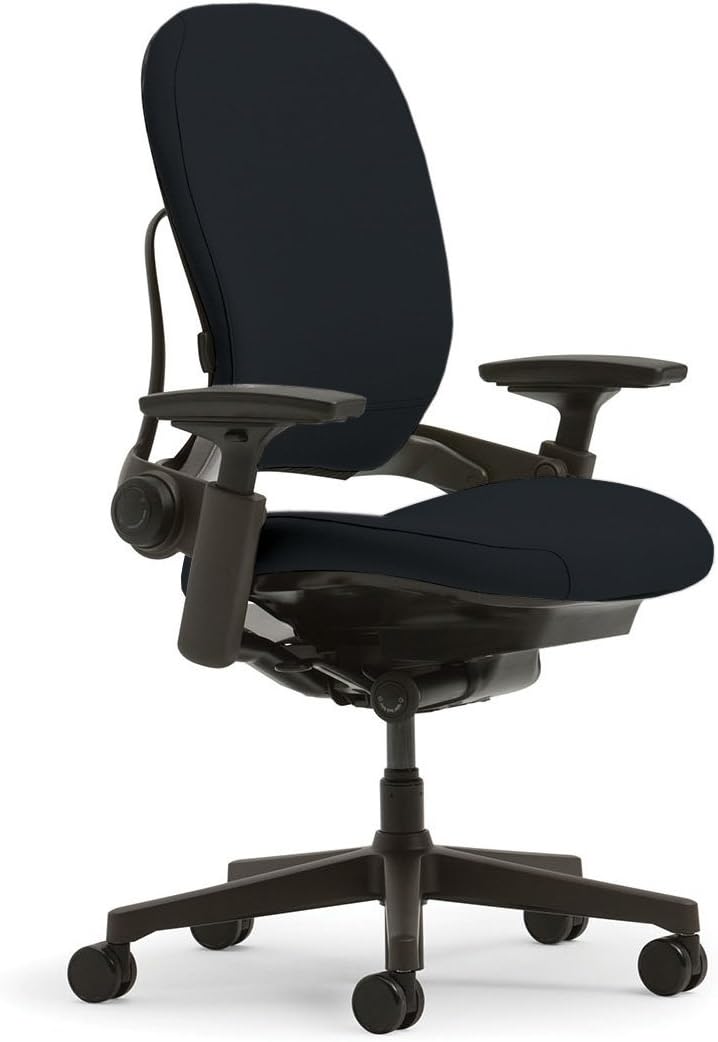
| Premium pick | Steelcase Leap – sophisticated LiveBack support and 4D armrests. |
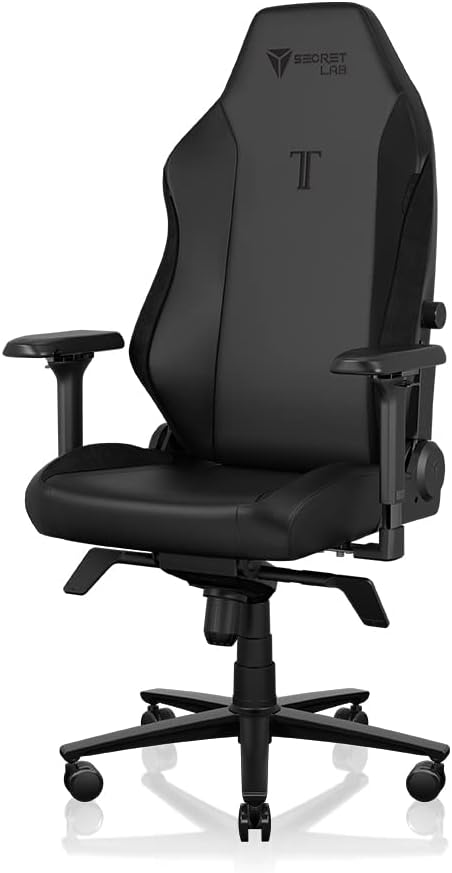
| Best for long sessions | Secretlab Titan Evo – magnetic lumbar system and plush upholstery for marathon work or gaming. |
| Best value | Branch Ergonomic Chair – solid ergonomics at a mid‑range price. |
| Budget ergonomic | Autonomous ErgoChair Pro – surprisingly deep adjustability for the price. |
Comparison table
| Product | Price range* | Adjustability | Lumbar support | Seat material | Weight capacity | Warranty | Rating |
|---|---|---|---|---|---|---|---|
| Herman Miller Aeron | $1,200–$1,600 | 12‑point (seat depth, tilt, arm height, arm width, lumbar, etc.) | Pellicle mesh with optional PostureFit SL | 8‑zone breathable mesh | 300 lb (136 kg) | 12 yr limited | 4.7/5 |
| Steelcase Leap | $900–$1,200 | 10‑point (LiveBack, seat depth, tilt, arm 4‑D) | LiveBack with adjustable lumbar | Fabric or leatherette | 400 lb (181 kg) | 10 yr limited | 4.6/5 |
| Secretlab Titan Evo | $449–$599 | 7‑point (seat height, recline, lumbar, arm, tilt tension) | Magnetic lumbar system (adjustable) | PU leather or fabric | 330 lb (150 kg) | 5 yr limited | 4.6/5 |
| Branch Ergonomic Chair | $350–$450 | 8‑point (seat depth, tilt, lumbar, arm height/width) | Integrated lumbar pad (fixed) | Breathable mesh | 300 lb (136 kg) | 5 yr limited | 4.5/5 |
| Autonomous ErgoChair Pro | $399–$499 | 9‑point (seat depth, tilt, lumbar, 4‑D arms) | Adjustable lumbar support (height + depth) | Breathable mesh | 300 lb (136 kg) | 5 yr limited | 4.5/5 |
\*All prices are typical retail ranges in the U.S. and can vary with sales, bundles, or regional taxes.
What to look for
When I started comparing chairs, I realized that “ergonomic” is a marketing umbrella that can hide wildly different engineering. Below are the concrete criteria that separate a chair that will actually improve your workday from one that just looks the part.
1. Adjustability count and range
| Adjustment | Why it matters | Typical range |
|---|---|---|
| Seat height | Aligns hips with knees (roughly 90° angle) to reduce pressure on the lower back. | 16–22 in (40.5–55.9 cm) |
| Seat depth | Allows you to sit back while keeping a 2‑3 in gap between the back of the knees and seat edge. | 15–19 in (38–48 cm) |
| Backrest tilt & tension | Controls recline angle (0° upright to 120° relaxed) and how easily the chair leans. | 0–120° tilt, 3–5 tension levels |
| Lumbar height & firmness | Positions the support under the lumbar curve (L3–L5). | 6–12 in vertical travel, 3‑5 firmness settings |
| Armrest height, width, depth, pivot (4‑D) | Keeps shoulders relaxed and elbows at ~90°. | Height 6–12 in, width 5–9 in, depth 2–4 in, pivot 0–15° |
| Seat tilt angle | Encourages a forward‑leaning posture for active sitting. | 0–15° forward tilt |
A chair that offers at least seven independent adjustments (seat height, depth, back tilt, lumbar, arm height, arm width, arm pivot) will give you the flexibility to fine‑tune your posture. Anything less usually forces you into a compromise.
2. Lumbar support mechanism
- Fixed pads (e.g., a static foam block) are cheap but often sit too high or low for many users.
- Adjustable pads that move up/down and sometimes in/out provide a better fit for a range of body types.
- Dynamic systems (e.g., Steelcase’s LiveBack or Secretlab’s magnetic lumbar) change shape as you move, offering continuous support.
If you have a history of lower‑back discomfort, prioritize a dynamic or highly adjustable lumbar system. If you’re a tall or short user, make sure the lumbar height range covers at least 6–12 in.
3. Seat material and breathability
| Material | Pros | Cons | Typical lifespan |
|---|---|---|---|
| Mesh (e.g., Pellicle, breathable mesh) | Excellent airflow, prevents heat buildup, conforms to body shape. | Can feel “squishy” under heavy weight, may wear out faster. | 5–7 years |
| PU leather | Soft, premium look, easy to clean. | Traps heat, can crack with age. | 4–6 years |
| Fabric (woven) | Good balance of feel and breathability, often more durable than leather. | Stains more easily, may pill. | 6–8 years |
| High‑density foam | Provides firm cushioning, good for short‑term sitting. | Compresses over time, less supportive for long sessions. | 3–5 years |
For a home office that gets hot in summer, a mesh seat is usually the safest bet. If you value a luxurious feel and plan to keep the chair in a climate‑controlled room, a high‑quality PU leather works fine.
4. Weight capacity and stability
A chair that’s rated for 300 lb (136 kg) is adequate for most adults, but if you’re on the heavier side or plan to add accessories (like a footrest), look for 400 lb (181 kg) capacity. Higher capacity often translates to a sturdier base (thicker steel or aluminum) and a wider seat base, reducing wobble.
5. Tilt and recline mechanisms
- Synchro‑tilt: The seat and back recline together at a set ratio, preserving lumbar angle.
- Independent tilt: Allows you to recline the back while keeping the seat level (good for “active sitting”).
- Lock positions: Some chairs lock at multiple angles (e.g., 0°, 45°, 90°) for quick changes.
If you alternate between focused typing and relaxed reading, a synchro‑tilt with lockable positions offers the most versatility.
6. Armrest flexibility
Four‑dimensional (4‑D) armrests give you height, width, depth, and pivot adjustments. This is crucial for:
- Reducing shoulder elevation (height)
- Keeping elbows close to the body (width)
- Allowing forearms to rest comfortably while typing (depth)
- Supporting a relaxed posture when leaning back (pivot)
If you use a standing desk or frequently switch between sitting and standing, consider a chair with removable or height‑only armrests so they don’t interfere.
7. Build quality and warranty
A longer warranty signals confidence from the manufacturer. Look for:
- Frame: Powder‑coated steel or aluminum (high durability, rust‑resistant)
- Base: Five‑legged base with casters rated for carpet and hard floor.
- Cushioning: High‑density foam or proprietary polymer (e.g., Aeron’s Pellicle).
A minimum 5‑year warranty is a good baseline; 10‑year or more is typical of premium brands and usually covers all moving parts.
8. Noise and mobility
If you share a quiet office or work from a home study, silent casters (rubber or polyurethane) are essential. Metal casters can squeak on hardwood. Check the caster material and whether the chair includes a glide‑lock feature for when you need the chair stationary.
9. Footprint and aesthetics
- Seat width: 20–22 in (51–56 cm) is standard. Wider seats can feel “roomy” but may look bulky.
- Overall depth: 30–34 in (76–86 cm) from front of seat to back of base.
- Color options: Neutral tones (black, graphite, charcoal) blend into most office décor; brighter colors can be a statement but may clash with corporate environments.
Measure your space before ordering—especially if you have a small home office or need to fit under a desk with a low clearance (most chairs require at least 28 in of clearance for the backrest).
Herman Miller Aeron (Best overall)
Who it suits The Aeron is a classic for anyone who spends 8 + hours at a desk, values long‑term durability, and is willing to invest in a chair that ages gracefully. Its size options (A, B, C) accommodate a wide range of body dimensions—from 5’2” to 6’6”.
One thing it does better than the rest The Patented Pellicle mesh combines breathability with a supportive “sling” that distributes weight evenly. It eliminates hot spots, which is a common complaint on foam‑filled seats.
Honest drawback The price ceiling is steep; even the “standard” configuration often tops $1,200. Additionally, the lumbar support (PostureFit SL) is an optional add‑on, so you may need to spend extra for full lower‑back coverage.
Who should skip it If you’re on a tight budget (< $500) or prefer a plush, upholstered feel over mesh, the Aeron will feel over‑engineered and financially excessive.
Steelcase Leap (Premium pick)
Who it suits The Leap shines for mid‑to‑high‑budget professionals who want a chair that adapts as their posture changes throughout the day. It’s especially good for taller users (up to 6’5”) because of its generous seat depth range.
One thing it does better than the rest LiveBack technology—the backrest flexes in sync with your spine, offering continuous lumbar support without manual adjustments. This dynamic response reduces the need to constantly fine‑tune the lumbar knob.
Honest drawback The armrest pivot feels a bit stiff after prolonged use, and the fabric options can be prone to staining if you have a spill‑prone environment.
Who should skip it If you need a chair under $800 or you’re looking for a minimalist aesthetic (the Leap’s design is more “office‑y”), you might find better value elsewhere.
Secretlab Titan Evo (Best for long sessions)
Who it suits Gamers, designers, or anyone who alternates between intense focus and relaxed reclining will love the Titan Evo. Its generous seat width (22 in) and plush cushioning make it comfortable for marathon sessions.
One thing it does better than the rest The magnetic lumbar system lets you slide the lumbar pad forward or backward with a simple click, and the magnetic force provides a consistent, adjustable firmness without a mechanical knob.
Honest drawback The PU leather upholstery can become sticky in hot, humid rooms, and the chair’s overall height (including the high back) may be too tall for low‑clearance desks.
Who should skip it If you’re looking for a classic mesh chair for breathability or you have a very small office where a 22‑in seat would dominate the space, the Titan Evo may feel too bulky.
Branch Ergonomic Chair (Best value)
Who it suits Remote workers, freelancers, or small‑business owners who need solid ergonomics without breaking the bank will find the Branch chair a sweet spot. Its sleek silhouette fits well in modern home offices.
One thing it does better than the rest It offers full ergonomic adjustability (seat depth, lumbar height, 4‑D arms) at a price that undercuts most premium competitors by 30‑40 %.
Honest drawback The lumbar pad is fixed in height; you can only adjust its firmness, not its vertical position. Tall users may find it sits too low.
Who should skip it If you have severe lower‑back issues that require a highly customizable lumbar system, you may need a chair with a more sophisticated lumbar mechanism (e.g., Leap or Aeron).
Autonomous ErgoChair Pro (Budget ergonomic)
Who it suits Students, entry‑level professionals, or anyone setting up a first home office will appreciate the ErgoChair Pro’s blend of adjustability and price.
One thing it does better than the rest Its 4‑D armrests are surprisingly robust for the price point, offering height, width, depth, and pivot adjustments that many “budget” chairs lack.
Honest drawback The cushioning compresses after about six months of daily use, which can reduce comfort if you sit for long periods without a seat pad.
Who should skip it If you need a chair that will last 10+ years or you have a higher weight requirement (> 350 lb), the ErgoChair Pro’s construction may feel insufficient.
Common mistakes
| Mistake | Why it hurts | How to avoid |
|---|---|---|
| Choosing based only on looks | Aesthetic appeal doesn’t guarantee ergonomic function; you may end up with a pretty but painful chair. | Test the adjustability and lumbar support in person or watch detailed video reviews. |
| Ignoring weight capacity | Exceeding the rated capacity can cause premature frame failure and unsafe wobbling. | Check the chair’s max weight and compare it to your own weight plus any accessories. |
| Skipping the seat‑depth adjustment | A seat that’s too deep forces you to sit forward, straining the hips; too shallow reduces support. | Measure the distance from the back of your knee to the seat edge (2–3 in gap) and verify the chair’s range. |
| Assuming “ergonomic” = “healthy” | Ergonomic features help maintain neutral posture but won’t cure chronic back conditions. | Use the chair as a tool, not a cure; consult a medical professional for persistent pain. |
| Buying the cheapest option without a warranty | Low‑cost chairs often have limited or no warranty, leaving you stuck with a defective product. | Prioritize chairs with at least a 5‑year warranty; it’s a proxy for build quality. |
| Neglecting caster type for floor | Hard‑floor casters can scratch wood; carpet casters can sink into plush carpet. | Choose rubber or polyurethane casters appropriate for your flooring. |
How to match it to your budget
1. Define your “must‑haves.”
- If you must have a dynamic lumbar system, start looking at the Aeron or Leap.
- If you must stay under $500, the Branch and ErgoChair Pro are the only viable options.
2. Allocate a “future‑proof” buffer.
- Chairs often go on sale 10–20 % during holiday events. If your target price is $800, consider a $1,000 model that will likely dip into your range later.
3. Factor in ancillary costs.
- Assembly: Some premium chairs require professional assembly (extra $50‑$100).
- Accessories: A footrest, lumbar pillow, or headrest can add $30‑$150.
- Shipping: Heavy chairs may have a $30‑$70 shipping fee.
4. Apply the 80/20 rule.
- Spend 80 % of your budget on the core chair (frame, adjustability, support).
- Use the remaining 20 % for accessories, warranty extensions, or a quality mat.
5. Consider longevity vs. replacement cycle.
- A $1,200 Aeron can last 10+ years, equating to $120 per year.
- A $400 budget chair may need replacement in 5 years, costing $80 per year plus replacement hassle.
Choose the tier that aligns with how long you intend to keep the chair and how much you value convenience over upfront cost.
Who should skip this
Ergonomic office chairs, even the best ones, are not a universal solution. You might want to skip an ergonomic chair altogether if:
- You stand more than you sit (e.g., a standing‑desk‑only workflow). A high‑quality anti‑fatigue mat may be more beneficial.
- Your workspace is extremely tight (less than 30 in of clearance behind the desk). A compact stool or a low‑profile task chair could fit better.
- You have severe medical conditions that require a specialized medical chair (e.g., pressure‑relief cushions, custom‑molded seating). Consult a healthcare provider for a prescription‑grade solution.
- You’re a mobile worker who needs a lightweight, foldable chair for co‑working spaces. Most ergonomic chairs weigh 30–45 lb and are not travel‑friendly.
FAQ
Q1: My lower back hurts after a few hours of sitting. Will any of these chairs cure that? A: None of the chairs are medical devices, but a chair with dynamic lumbar support (like the Aeron’s PostureFit SL or Leap’s LiveBack) can help maintain a neutral spine, which may reduce strain. If pain persists, see a doctor or physical therapist.
Q2: I have a small home office (48 × 48 in). Which chair fits without crowding the space? A: The Autonomous ErgoChair Pro and Branch Ergonomic Chair have a compact footprint (overall depth ~30 in) and a slimmer backrest profile, making them the best candidates for tight spaces.
Q3: I’m tall (6’4”). Which chair offers enough seat depth and backrest height? A: The Steelcase Leap and Herman Miller Aeron (size C) provide the longest seat depth (up to 19 in) and higher backrests, accommodating taller users comfortably.
Q4: My office has hardwood floors. Will the casters damage them? A: Look for chairs with rubber‑coated polyurethane casters—both the Aeron and Leap include floor‑friendly casters. The Branch and Autonomous models also ship with soft‑tread casters suitable for hardwood.
Q5: I’m a gamer who streams for 10‑hour sessions. Which chair balances comfort and aesthetics? A: The Secretlab Titan Evo is designed with long‑session comfort in mind, featuring a plush seat and magnetic lumbar system. Its sleek, modern design also looks great on camera.
Q6: Can I use an ergonomic chair with a standing desk? A: Absolutely. Most ergonomic chairs have a height range that works with standing‑desk heights (typically 28–48 in). The Branch Ergonomic Chair and ErgoChair Pro have the widest height ranges, making them easy to adjust when you raise or lower the desk.
The bottom line
Choosing an ergonomic office chair without overpaying boils down to matching adjustability, lumbar support, and material to your body and work habits, then fitting that package into a realistic budget. The Herman Miller Aeron remains the gold standard for durability and breathability, while the Steelcase Leap offers sophisticated dynamic support at a lower price point. For marathon sessions, the Secretlab Titan Evo shines, and the Branch and Autonomous chairs give you solid ergonomics without the flagship price tag.
Take the time to measure your space, test the adjustments (or watch thorough demos), and weigh the warranty against the cost—the right chair will pay for itself in comfort, productivity, and fewer trips to the doctor. Happy sitting!
Browse every office chairs on Amazon
Our picks are the ones we would buy — but if none of them fit your desk or budget, here is the full range with live prices and customer reviews.
🔎 See all office chairs on Amazon →Common questions
Can an office chair fix my lower back pain?
A chair changes how long you can sit before it hurts; it is not a cure. The parts that actually matter are adjustable lumbar support that moves to meet the curve of your lower back, a seat depth around 17–21 inches so the edge does not press into your thighs, and a recline you can lock somewhere between upright and about 125 degrees. If pain persists or radiates, see a doctor — no chair replaces that.
Mesh or foam for a bad lower back?
Mesh keeps you cooler and spreads pressure, which suits long sitting in a warm room. Dense foam gives firmer, more localised support and holds its shape under heavier use. Neither wins outright — the adjustability of the lumbar unit matters far more than what the seat is made of.
Do I really need adjustable lumbar support?
Yes, if you sit for hours. Fixed lumbar is built for an average back and yours probably is not it. Look for lumbar that moves both up and down and, ideally, in and out — a support in the wrong place does nothing at best.
Should I get a headrest?
A headrest helps only if you actually recline. If you sit upright and lean forward at a desk all day, it will sit behind your head untouched and you paid for it anyway.
What are the best office chairs right now?
Our top pick is the Herman Miller Aeron. The Aeron’s patented Pellicle mesh and 12 adjustments keep you comfortable longer than any generic office chair. Its durability and design set the industry standard.
How much should I spend on office chairs?
Across the 5 models we compare here, typical street prices run from $399–$499 at the low end up to $759.00. Most people are best served in the middle bracket — the cheapest option usually gives up build quality, the most expensive buys refinement you only notice with daily use.
Are budget office chairs worth buying?
For light or occasional use, yes — the Autonomous ErgoChair Pro covers the basics. If you use it every working day, stepping up one bracket is usually the cheaper decision over a couple of years.